



Blog
Route Planner Excel Add-in: Save 20-30% Fuel | Complete Guide

The Ultimate Solution for Delivery, Sales & Service Route Planning
## What is Route Planner Excel Add-in?
## Why Every Business Needs a Route Planner Excel Add-in
## Route Planner Excel Add-in Features
## How Route Planner Excel Add-in Works
## Route Planner Excel Add-in vs Manual Planning
## Table of Contents
1. [Introduction: The Route Planning Crisis](#introduction)
2. [Who Needs Route Optimization?](#who-needs)
3. [The Hidden Costs of Manual Route Planning](#hidden-costs)
4. [Route Planner Pro: Complete Feature Breakdown](#features)
5. [Step-by-Step: How It Works](#how-it-works)
6. [Real-World Use Cases](#use-cases)
7. [ROI Calculator: Your Savings Breakdown](#roi)
8. [Google Maps API Integration Explained](#api)
9. [Multi-Vehicle Fleet Management](#multi-vehicle)
10. [Comparison: Manual vs Automated](#comparison)
11. [Installation & Setup Guide](#installation)
12. [Frequently Asked Questions](#faq)
13. [Conclusion](#conclusion)
—
Looking for a powerful route planner Excel add-in to optimize your delivery routes? You’re in the right place. This route planner Excel add-in helps Indian businesses save 20-30% fuel by finding the shortest path to all stops. Whether you run a delivery business, field sales team, or service company, this route planner Excel add-in transforms chaotic manual planning into one-click optimization.
## 🚗 Introduction: The Route Planning Crisis in India
Every day, millions of delivery executives, sales representatives, and service technicians across India hit the roads. And every day, most of them travel **20-30% more kilometers than necessary**.
**Why?** Because they’re using outdated route planning methods:
– Gut feeling and memory
– Random Google Maps checks
– Paper-based route lists
– Trial and error over weeks
The result? **Wasted fuel, wasted time, missed deliveries, and frustrated customers.**
### The Numbers Don’t Lie
| Metric | Without Optimization | With Optimization | Difference |
|——–|———————|——————-|————|
| Daily Distance | 60 km | 42 km | -18 km (30%) |
| Fuel Cost (₹8/km) | ₹480 | ₹336 | ₹144 saved |
| Monthly Fuel Cost | ₹12,000 | ₹8,400 | ₹3,600 saved |
| Planning Time | 45 min/day | 5 min/day | 40 min saved |
| Deliveries/Day | 12 | 16 | +4 more |
**For a single vehicle. Multiply by your fleet size.**
—
## 👥 Who Needs Route Optimization?
### 1. E-commerce & Delivery Businesses
**The Challenge:** 20-50 daily deliveries across the city. Random order leads to backtracking.
**The Solution:** Optimize sequence to minimize total distance. Complete more deliveries per trip.
**Real Example:**
Mumbai-based delivery company reduced daily kilometers from 85 to 58 — saving ₹6,480 monthly per vehicle.
—
### 2. Dairy & Milk Collection Routes
**The Challenge:** Visit 15-30 villages for milk collection every morning. Time-sensitive operation.
**The Solution:** Find optimal village sequence. Include return trip calculation.
**Real Example:**
Dairy cooperative in rural Maharashtra cut collection time by 1.5 hours daily.
—
### 3. Field Sales Teams
**The Challenge:** Meet 8-12 clients daily. Some prefer morning, some evening. Traffic varies.
**The Solution:** Plan client visits in logical geographic order. Factor in appointment windows.
**Real Example:**
Pharmaceutical sales rep in Pune increased client meetings from 8 to 11 per day.
—
### 4. Service Technicians
**The Challenge:** Plumbers, electricians, AC repair — emergency calls plus scheduled visits.
**The Solution:** Quickly re-optimize routes when new service calls come in.
**Real Example:**
AC service company reduced technician idle time by 45 minutes daily.
—
### 5. Retail Distribution
**The Challenge:** Stock delivery to 30+ retail stores. Some need morning delivery, some flexible.
**The Solution:** Cluster stores geographically. Assign routes to multiple vehicles.
**Real Example:**
FMCG distributor in Nashik reduced fleet from 4 vehicles to 3 with better routing.
—
### 6. Courier & Logistics
**The Challenge:** Thousands of packages, multiple delivery zones, time-bound commitments.
**The Solution:** Multi-vehicle routing with load balancing and zone clustering.
**Real Example:**
Regional courier service improved on-time delivery rate from 82% to 94%.
—
## 💸 The Hidden Costs of Manual Route Planning
Most business owners only see the obvious costs. The **hidden costs** are far greater:
### 1. Fuel Wastage (₹1,500-5,000/month per vehicle)
Extra kilometers = Extra fuel = Extra money burned.
### 2. Vehicle Wear & Tear
More kilometers = More maintenance = Higher long-term costs.
### 3. Driver Fatigue
Inefficient routes mean longer hours. Tired drivers make mistakes.
### 4. Missed Opportunities
Time spent on the road = Time NOT spent with customers.
### 5. Customer Dissatisfaction
Late deliveries = Bad reviews = Lost customers.
### 6. Planning Time
**45 minutes daily × 25 working days = 18+ hours/month** spent just planning routes!
—
## 🔥 Route Planner Pro: Complete Feature Breakdown
### Feature 1: TSP Route Optimization 🎯
**What It Does:**
Finds the mathematically shortest route visiting all stops using the Traveling Salesman Problem (TSP) algorithm.
**Why It Matters:**
For 15 stops, there are 1.3 trillion possible routes. No human can evaluate all options. The algorithm does it in seconds.
**How It Works:**
1. Calculates distances between all stop pairs
2. Uses Nearest Neighbor algorithm for initial route
3. Applies 2-opt improvement for optimization
4. Returns optimal sequence
**Your Benefit:**
✅ 20-30% shorter routes
✅ Scientifically optimal, not guesswork
✅ Works with 50+ stops
—
### Feature 2: Multi-Vehicle Support 🚐
**What It Does:**
Automatically splits stops among multiple vehicles using K-means clustering algorithm.
**Why It Matters:**
When you have 30 stops and 3 vehicles, manual splitting often creates overlap. Clustering ensures geographic separation.
**How It Works:**
1. Groups stops into clusters based on location
2. Assigns each cluster to a vehicle
3. Optimizes route within each cluster
4. Balances workload across vehicles
**Your Benefit:**
✅ No overlapping routes
✅ Balanced workload
✅ Supports 2-10 vehicles
—
### Feature 3: Google Maps Integration 🗺️
**What It Does:**
Gets real road distances and travel times from Google Maps Distance Matrix API.
**Why It Matters:**
Straight-line distance is useless. Real roads have turns, one-ways, and varying speeds. Google Maps knows actual driving conditions.
**How It Works:**
1. Sends origin-destination pairs to Google API
2. Receives distance in km and time in minutes
3. Uses real data for optimization
**Your Benefit:**
✅ Accurate road distances
✅ Real travel times
✅ Traffic-aware calculations
—
### Feature 4: 6 Address Format Support 📍
**What It Does:**
Accepts addresses in multiple formats without manual conversion.
**Supported Formats:**
| Format | Example |
|——–|———|
| Indian Address | Shop 12, MG Road, Pune 411001 |
| GPS Coordinates | 18.5204, 73.8567 |
| Google Format | 18.5204,73.8567 |
| Decimal Degrees | 18.520400, 73.856700 |
| Place Name | Pune Railway Station |
| Custom Reference | Customer ABC (with saved location) |
**Your Benefit:**
✅ No manual coordinate lookup
✅ Copy-paste from any source
✅ Mix formats in same sheet
—
### Feature 5: Arrival Time Estimation ⏰
**What It Does:**
Calculates expected arrival time at each stop based on start time, travel time, and stop duration.
**How It Works:**
1. Set your journey start time
2. Define average stop duration
3. Algorithm adds travel time between stops
4. Shows ETA for each location
**Output Example:**
| Stop | Distance | Travel Time | Arrival |
|——|———-|————-|———|
| Start | 0 km | – | 9:00 AM |
| Stop 1 | 5 km | 12 min | 9:12 AM |
| Stop 2 | 8 km | 18 min | 9:45 AM |
| Stop 3 | 6 km | 15 min | 10:15 AM |
**Your Benefit:**
✅ Know when you’ll reach each customer
✅ Plan appointments accurately
✅ Inform customers in advance
—
### Feature 6: Round Trip Support 🔄
**What It Does:**
Includes return journey in total distance calculation.
**Why It Matters:**
Delivery routes usually end back at warehouse/office. Round trip gives true daily distance.
**Options:**
– One-way (end at last stop)
– Round trip (return to start)
**Your Benefit:**
✅ Accurate total distance
✅ Better fuel estimation
✅ Complete journey planning
—
### Feature 7: Export & Share Options 📤
**What It Does:**
Export optimized route in multiple formats for navigation and sharing.
**Export Options:**
| Option | Use Case |
|——–|———-|
| **Google Maps Link** | Open in browser for turn-by-turn navigation |
| **WhatsApp Share** | Send route to driver’s phone |
| **PDF Export** | Print physical route sheet |
| **Copy to Clipboard** | Paste in other applications |
**Your Benefit:**
✅ Instant navigation ready
✅ Easy driver communication
✅ Backup paper copy
—
### Feature 8: Route History & Templates 💾
**What It Does:**
Save frequently used routes for quick reuse.
**Why It Matters:**
Many businesses have recurring routes (weekly deliveries to same customers). No need to re-enter stops.
**How It Works:**
1. Optimize a route
2. Click “Save Route”
3. Name it (e.g., “Monday Route Zone A”)
4. Load anytime with one click
**Your Benefit:**
✅ Save time on recurring routes
✅ Maintain route history
✅ Quick route switching
—
### Feature 9: Distance-Only Calculation 📏
**What It Does:**
Calculate distances without changing stop order.
**Why It Matters:**
Sometimes you have a fixed sequence (time-based appointments). You just need to know total distance.
**Your Benefit:**
✅ Flexible usage
✅ Works with fixed schedules
✅ Distance estimation tool
—
### Feature 10: Dashboard & Quick Start 📊
**What It Does:**
Central dashboard showing:
– Current status
– API quota usage
– Quick action buttons
– Getting started guide
**Your Benefit:**
✅ Easy navigation
✅ Monitor API usage
✅ Fast access to all features
—
## 📖 Step-by-Step: How Route Planner Pro Works
### Step 1: Enter Your Stops
Open the **Stops** sheet and enter your delivery/visit locations:
| Sr. No. | Stop Name | Address |
|———|———–|———|
| 1 | Warehouse | Your Office Address |
| 2 | Customer A | MG Road, Pune |
| 3 | Customer B | FC Road, Pune |
| 4 | Customer C | Kothrud, Pune |
**Tips:**
– First row is usually your starting point
– Enter as many stops as needed (50+ supported)
– Use any address format
—
### Step 2: Configure Settings
Click **Settings** button and configure:
| Setting | Value |
|———|——-|
| Google Maps API Key | Your API key |
| Start Time | 9:00 AM |
| Stop Duration | 10 minutes |
| Round Trip | Yes/No |
—
### Step 3: Click Optimize
Press the **Optimize** button. The algorithm:
1. Fetches distances from Google Maps
2. Calculates optimal sequence
3. Reorders stops in Results sheet
4. Shows total distance, time, and savings
**Processing Time:** 10-30 seconds depending on stop count
—
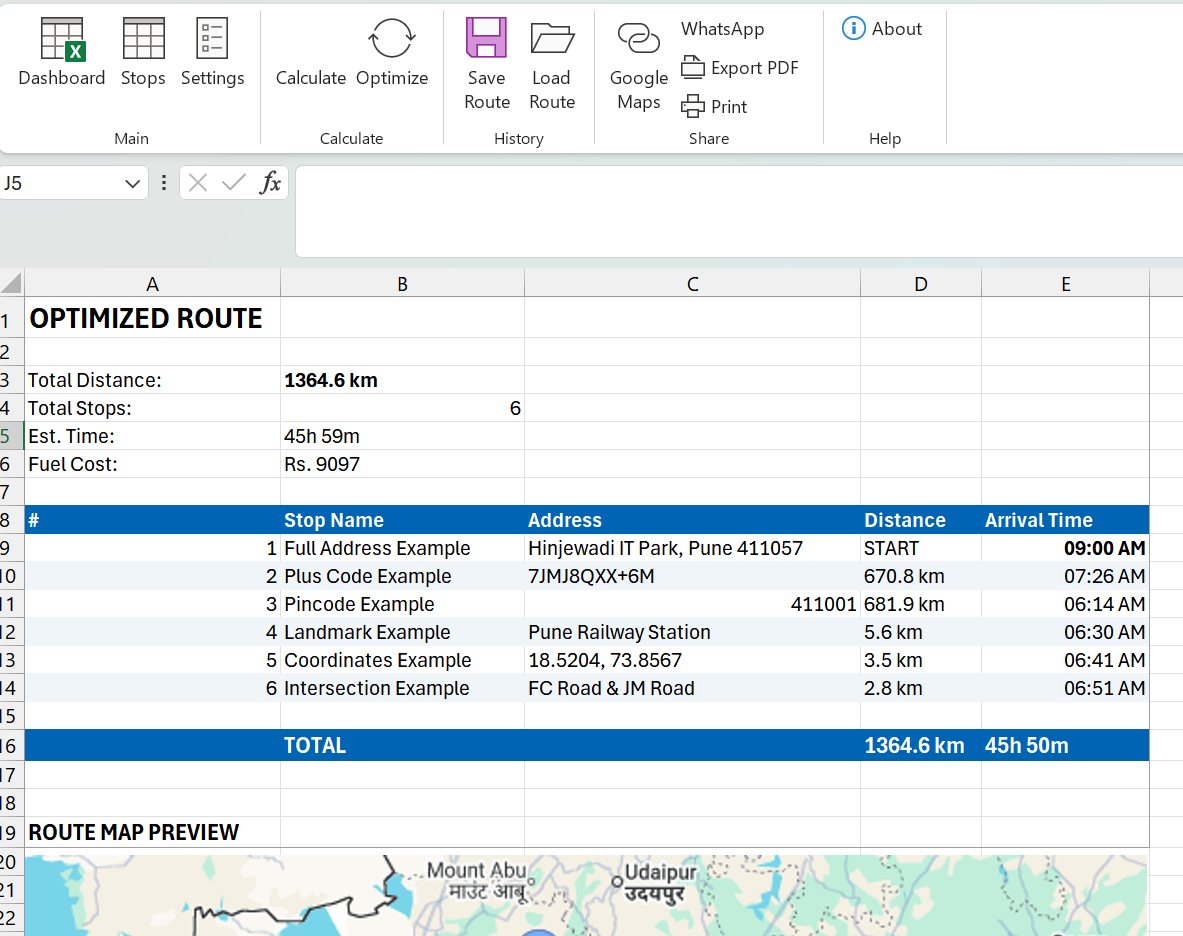
### Step 4: Review Results
Check the **Results** sheet:
| Order | Stop Name | Distance | Travel Time | Arrival |
|——-|———–|———-|————-|———|
| 1 | Warehouse | 0 km | – | 9:00 AM |
| 2 | Customer C | 3 km | 8 min | 9:08 AM |
| 3 | Customer B | 5 km | 12 min | 9:30 AM |
| 4 | Customer A | 4 km | 10 min | 9:50 AM |
| 5 | Return | 6 km | 15 min | 10:15 AM |
**Total: 18 km | Original: 26 km | Saved: 8 km (31%)**
—
### Step 5: Navigate
Click **Google Maps** button to open route in browser.
Or click **WhatsApp** to share with your driver.
**Done!** 🎉
—
## 🏢 Real-World Use Cases
### Use Case 1: Daily Delivery Business
**Business:** Online grocery delivery in Pune
**Challenge:** 35 orders daily, 2 delivery boys
**Before:** Random routing, 55 km per person
**After:** Optimized + multi-vehicle split, 38 km per person
**Monthly Savings:** ₹8,160 fuel + 3 hours time
—
### Use Case 2: Milk Collection Cooperative
**Business:** Village milk collection in Maharashtra
**Challenge:** 22 villages, morning timing critical
**Before:** Same sequence since 10 years (habit-based)
**After:** Optimized sequence
**Result:** Collection time reduced 90 minutes, more villages added
—
### Use Case 3: Pharma Sales Representative
**Business:** Medical representative in Mumbai
**Challenge:** 10 doctor visits daily, varying appointment windows
**Before:** 8 visits achievable, lots of waiting
**After:** Geographic clustering, 11 visits daily
**Result:** 37% increase in client coverage
—
### Use Case 4: AC Service Company
**Business:** Split AC installation & service
**Challenge:** 6-8 service calls daily, emergency calls disrupt plans
**Before:** Re-planning manually when new calls come
**After:** Quick re-optimization with new stops
**Result:** 2 additional service calls per technician
—
## 💰 ROI Calculator: Your Savings Breakdown
### Calculate Your Savings
Enter your numbers:
| Input | Your Value | Example |
|——-|————|———|
| Vehicles in fleet | ___ | 3 |
| Avg. daily distance/vehicle | ___ km | 50 km |
| Fuel cost per km | ₹___ | ₹8 |
| Working days/month | ___ | 25 |
| Expected optimization | 25% | 25% |
### Example Calculation:
| Metric | Before | After | Savings |
|——–|——–|——-|———|
| Daily distance (3 vehicles) | 150 km | 112 km | 38 km |
| Daily fuel cost | ₹1,200 | ₹896 | ₹304 |
| Monthly fuel cost | ₹30,000 | ₹22,400 | **₹7,600** |
| Yearly fuel savings | – | – | **₹91,200** |
### Tool Cost vs Savings:
| Item | Amount |
|——|——–|
| Route Planner Pro (One-time) | ₹2,999 |
| First Month Savings | ₹7,600 |
| **Payback Period** | **12 days!** |
—
## 🔧 Google Maps API Integration Explained
### Why Google Maps API?
| Direct Google Maps | Route Planner Pro + API |
|——————–|————————-|
| Manual checking | Automated calculation |
| One route at a time | Batch processing |
| No optimization | TSP algorithm |
| Can’t export data | Full Excel integration |
### Free Tier
Google provides **$200 free credit monthly** = approximately **28,500 distance calculations**.
For most businesses, **free tier is enough!**
### Cost Calculation
| Stops | API Calls Needed | Monthly Cost |
|——-|——————|————–|
| 10 stops/day | ~100 calls | Free |
| 20 stops/day | ~400 calls | Free |
| 50 stops/day | ~2,500 calls | Free |
| 100 stops/day | ~10,000 calls | ~₹500 |
### Setup Summary
1. Create Google Cloud account (free)
2. Enable Distance Matrix API
3. Generate API key
4. Enter in Route Planner Pro settings
5. Done!
—
## 🚐 Multi-Vehicle Fleet Management
### The Challenge
30 stops + 3 vehicles = How to split?
**Manual approach problems:**
– Uneven distribution
– Geographic overlap
– Wasted driving between zones
### The Solution: K-Means Clustering
Route Planner Pro uses K-means algorithm:
1. **Analyze locations** – Plot all stops geographically
2. **Create clusters** – Group nearby stops together
3. **Assign vehicles** – One cluster per vehicle
4. **Optimize each** – TSP within each cluster
### Result
| Vehicle | Zone | Stops | Distance |
|———|——|——-|———-|
| Vehicle 1 | North Zone | 10 | 18 km |
| Vehicle 2 | South Zone | 11 | 21 km |
| Vehicle 3 | East Zone | 9 | 16 km |
| **Total** | – | **30** | **55 km** |
**Without clustering:** Likely 75+ km with overlap!
—
## ⚖️ Comparison: Manual vs Route Planner Pro
| Aspect | Manual Planning | Route Planner Pro |
|——–|—————–|——————-|
| Time Required | 30-60 min/day | 5 min/day |
| Accuracy | 60-70% optimal | 95%+ optimal |
| Multi-Vehicle | Very difficult | Automatic |
| Real Distances | No (guesswork) | Yes (Google Maps) |
| Arrival Times | Manual calculation | Automatic |
| Route Sharing | Screenshot/verbal | Google Maps link |
| History | Paper notes | Saved templates |
| Learning Curve | N/A | 15 minutes |
| One-time Cost | Free | ₹2,999 |
| Monthly Savings | ₹0 | ₹2,000-10,000 |
—
## 📥 Installation & Setup Guide
### Step 1: Download
Download `RoutePlannerPro_v2.0.zip` from website.
### Step 2: Extract
Right-click → Extract All → Open folder
### Step 3: Install
Double-click `RoutePlannerPro_Setup.exe`
If Windows blocks: Click “More info” → “Run anyway”
### Step 4: Enable in Excel
1. Open Excel
2. File → Options → Add-ins
3. Manage: Excel Add-ins → Go
4. Check “Route Planner Pro”
5. OK
### Step 5: Configure API Key
1. Click Settings in Route Planner tab
2. Enter Google Maps API Key
3. Save
**Done! Start optimizing routes!**
—
## ❓ Frequently Asked Questions
### Q1: Is this a monthly subscription?
**No!** One-time payment of ₹2,999. Use forever. No recurring charges.
—
### Q2: Which Excel versions are supported?
Excel 2010, 2013, 2016, 2019, and Microsoft 365 (Windows only).
—
### Q3: Do I need internet connection?
Internet required only for Google Maps distance calculation. Basic features work offline.
—
### Q4: How many stops can I optimize?
Tested with 50+ stops. Algorithm handles large routes efficiently.
—
### Q5: Is Google Maps API free?
Yes! 28,500 distance calculations free monthly. Enough for most India businesses.
—
### Q6: Can multiple people use one license?
Single user license = 1 computer. Contact for multi-user pricing.
—
### Q7: What if I need help?
Phone + Email support included.
📞 9112344747
📧 support@primedigitaloffice.com
—
### Q8: Is there a trial version?
Contact us for demo. 30-day money back guarantee on purchase.
—
## 🎯 Conclusion: Transform Your Route Planning Today
Route optimization isn’t just about saving fuel—it’s about:
✅ **Doing more with less** – More deliveries, same fleet
✅ **Happy customers** – On-time every time
✅ **Reduced stress** – No more guesswork
✅ **Competitive advantage** – Lower costs, better service
### The Choice is Clear
| Keep Doing Manual | Switch to Route Planner Pro |
|——————-|—————————-|
| Waste 20-30% fuel | Optimize every kilometer |
| Spend hours planning | 5 minutes and done |
| Guess and hope | Science-backed optimization |
| Limited growth | Scale efficiently |
### Get Started Today
**Route Planner Pro**
~~₹3,999~~ **₹2,999** (Limited Time)
✅ One-time payment
✅ Lifetime license
✅ 1 year free updates
✅ Phone + email support
✅ 30-day money back guarantee
Learn more about [Google Maps API](https://developers.google.com/maps/documentation/distance-matrix)
See how [TSP algorithm works](https://en.wikipedia.org/wiki/Travelling_salesman_problem)
Check [Microsoft Excel official site](https://www.microsoft.com/excel)
—
## 👨💻 About the Author
**Ajay Tambe** is the founder of Prime Digital Office, specializing in Excel automation tools for Indian businesses. With expertise in VBA programming and business process optimization, he has helped hundreds of businesses save time and money through smart automation.
**Prime Digital Office**
📞 9112344747
📧 support@primedigitaloffice.com
🌐 primedigitaloffice.com
—
*© 2026 Prime Digital Office. All rights reserved.*